
A label can be printed correctly and still fail to run if the roll format does not match the equipment. Use this checklist with your applicator or printer specification before confirming a production order.
Unwind direction guide and roll checklist
Use the drawing on page 1 to name the printed face and the first artwork edge to feed. On page 2, enter your machine model, roll and label dimensions, quantities and sensor requirements. Use one sheet for each roll format.
Confirm These Details
| Specification | What to provide |
|---|---|
| Core inside diameter | The diameter of the opening that fits the machine spindle. A 3-inch core is nominally 76.2 mm; confirm the machine tolerance. |
| Maximum roll outside diameter | The largest finished roll the machine can accept. This is different from core diameter. |
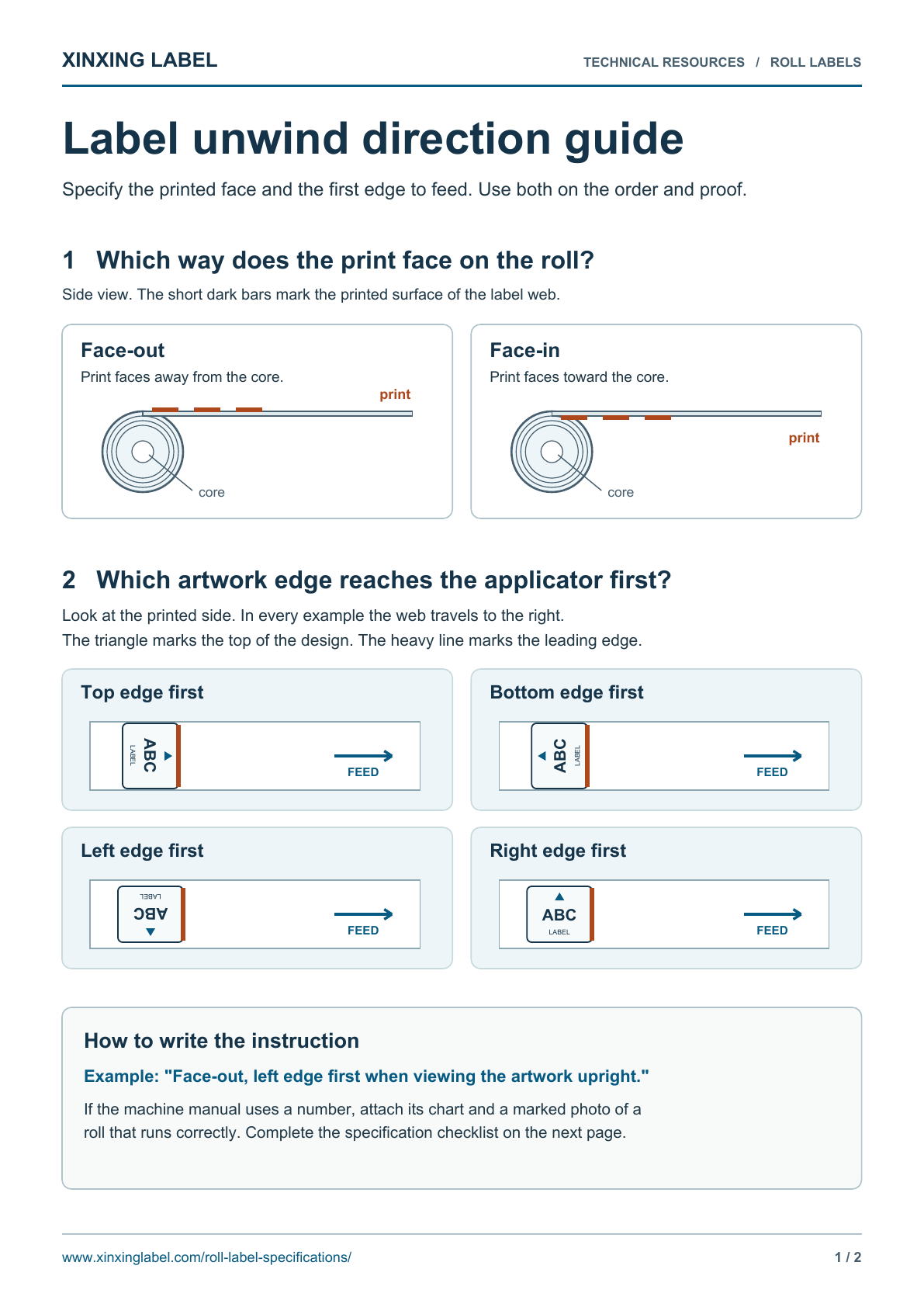
| Winding and orientation | Labels wound face-in or face-out, plus the edge that feeds first. Use a drawing or photograph. |
| Label and web dimensions | Finished label width and length, label gap, liner width and the direction of travel. |
| Quantity per roll | Preferred labels per roll, subject to the permitted roll diameter and construction thickness. |
| Liner and sensing | Release-liner requirements and any label-gap, clear-label or registration-mark sensing requirements. |
| Splices and leaders | Tell us your machine or quality requirements for splices, leaders and roll identification. |
Measure the Roll and Label Web
Measure the core opening and finished roll separately. The permitted sizes come from your applicator or printer.
Label length runs with the feed direction; label width runs across the web. Diagrams are schematic and not to scale.
Avoid an Unwind-Direction Mix-Up
Do not send only an unwind number without its reference chart. Suppliers may use different numbering conventions. Show whether the print faces inward or outward and which edge of the design leads as the web leaves the roll. A marked photograph of a roll that already works is useful.
If You Print on the Labels
Provide the printer make and model, printing technology, ribbon where used and the data to be added. Direct thermal and thermal transfer are different constructions. An overprint trial checks the label surface and print durability as well as physical roll fit.
Before Approving the Full Run
For a new format, test a representative roll on the intended equipment. Check dispensing, sensing, registration, label placement and any code printing at the intended settings. Confirm the approved roll specification with the artwork and material.
If You Do Not Know the Specification
Send the equipment manual or specification sheet, a photograph of the loaded roll and an example label. Identify anything that is still undecided; the dimensions and winding should be confirmed before production.